VIDEO CODECS • H.264 / AVC vs H.265 / HEVC
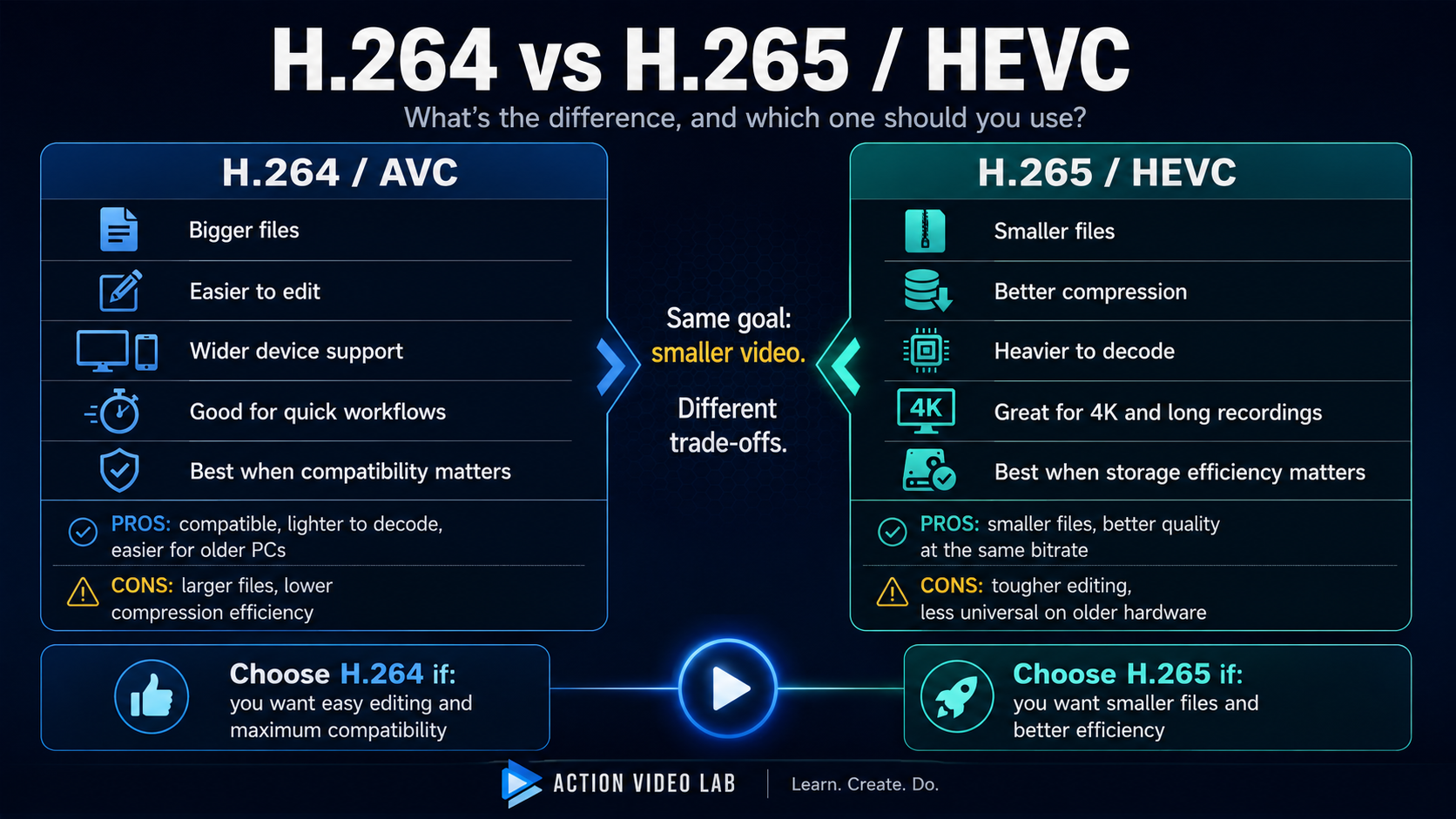
H.264 and H.265 are trying to solve the same problem: keep video looking good while using as little data as possible. H.265 usually does that job more efficiently. H.264 usually makes life easier for editors, older computers and devices.
If you are choosing a recording mode on a camera, exporting a video, or wondering why one file edits smoothly while another makes your timeline crawl, this comparison is for you.
The 20-second answer:
- Choose H.264 when compatibility and easier editing matter most.
- Choose H.265/HEVC when smaller files and better compression efficiency matter most.
- Do not assume H.265 is always “better quality.” At the same bitrate it can often preserve more quality, but bitrate, encoder quality and source material still matter.
- Do not convert camera footage automatically. If your editor handles the original files well, keep them. If not, hardware decoding or proxies are usually smarter than unnecessary transcoding.
First: H.264 and H.265 are more alike than they look
It is easy to think of H.265 as a completely different technology. It is not.
Both codecs belong to the same broad family of hybrid block-based video compression. In both cases, the encoder tries to predict what a region of the picture should look like, then stores the difference between that prediction and the real image. The remaining information is transformed, quantized and entropy-coded into a compact bitstream.
That sounds complicated, but the core idea is simple:
Do not save the same information again if you can describe how it changed.
Imagine a video of a teenager riding a skateboard past a brick wall. Between two nearby frames, most of the wall has barely changed. The skateboarder moved, but even the rider still looks mostly like the rider in the previous frame. A smart codec reuses that information instead of pretending every frame is a completely new photograph.
This predictive structure is central to H.264/AVC and remains central to HEVC/H.265. The scientific overview papers for both standards describe this same basic family of prediction, transform and entropy-coding tools, even though HEVC gives the encoder more flexible ways to use them.
The biggest difference: H.265 has more ways to describe the picture efficiently
The easiest way to understand the difference is to imagine packing a suitcase.
H.264 is already a very good packer. It folds things, groups them and avoids wasting obvious space.
H.265 is a more obsessive packer. It tries more arrangements, uses different box sizes depending on what it is packing, and spends extra effort finding a layout that wastes fewer bits.
One of the clearest technical examples is block structure.
- H.264 is traditionally organized around a 16×16 macroblock foundation, with smaller partitions available inside it.
- HEVC introduced Coding Tree Units that can be as large as 64×64 samples and can be recursively split when the picture needs more detail.
So if a frame contains a huge smooth blue sky, HEVC can use a large region efficiently. If another part of the frame contains hair, grass or tree branches, it can split that area into smaller regions.
That flexibility is powerful. It is also one reason the encoder has more decisions to make.
H.264 is efficient. H.265 is more flexible about where it spends bits and how it describes different parts of the picture.
Quality: does H.265 actually look better than H.264?
Not automatically. A codec name is not a quality setting.
A badly encoded H.265 video can look worse than a well-encoded H.264 video. Quality depends on the source, bitrate, encoder implementation, preset, profile, bit depth, motion, noise and many other settings.
Where H.265 has the advantage is compression efficiency. In controlled subjective testing reported by Ohm, Sullivan, Schwarz, Tan and Wiegand, HEVC encoders achieved equivalent subjective reproduction quality to H.264/AVC using roughly 50% less bitrate on average for the tested WVGA and HD material.
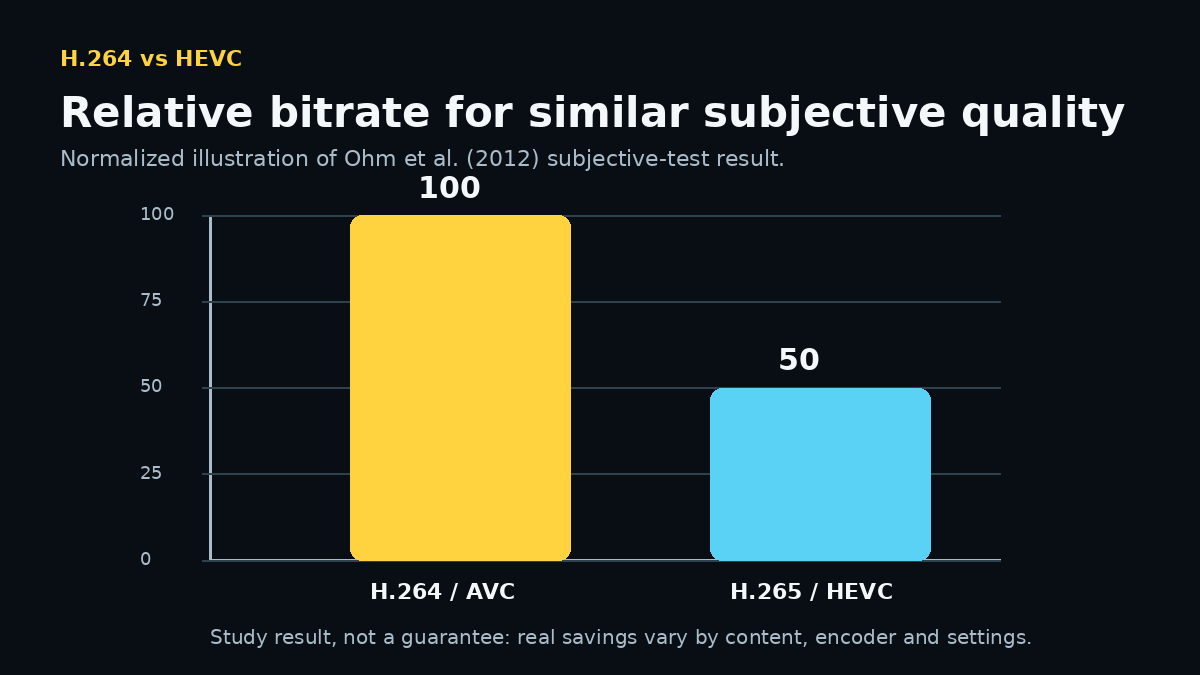
That does not mean every H.265 file will be exactly half the size of an H.264 file. The result is a useful scientific benchmark, not a universal promise.
A better way to say it is:
At a similar quality target, H.265 often needs fewer bits. At the same bitrate, H.265 often has more room to preserve difficult detail.
File size and bitrate: why H.265 often wins
If two videos have the same duration, file size is strongly influenced by bitrate.
A simplified relationship is:
file size ≈ bitrate × duration
So if a more efficient codec can reach a similar visual result at a lower bitrate, the file can also become smaller.
| Question | H.264 / AVC | H.265 / HEVC |
|---|---|---|
| Compression efficiency | Very good | Better |
| File size at a similar quality target | Usually larger | Usually smaller |
| Best reason to use it | Compatibility and workflow simplicity | Storage and bandwidth efficiency |
This is why modern cameras often use HEVC for demanding recording modes. High resolution, higher frame rates and longer recordings create enormous amounts of data. Better compression helps keep those files manageable.
Which codec is easier to edit?
For many users, H.264 is the easier choice for editing.
But there is an important technical nuance here.
The scientific HEVC complexity analysis by Bossen, Bross, Sühring and Flynn did not conclude that HEVC decoding is simply “twice as heavy” as H.264. Their analysis found that optimized HEVC decoder complexity did not appear dramatically different overall, while HEVC encoders were expected to be several times more complex.
So why does HEVC footage often feel heavier in a real editor?
Because HEVC is commonly used together with demanding recording formats:
- 4K or higher resolution;
- 50/60/120 fps;
- 10-bit color;
- HDR or Log profiles;
- high-bitrate action-camera footage;
- long-GOP frame dependencies;
- hardware decoding that may depend on GPU generation, profile and bit depth.
In other words, the user is often comparing something like 1080p 8-bit H.264 with 4K60 10-bit HEVC. Of course the second file can be harder to scrub, decode and process. The codec is only part of the workload.
Why editing is different from playback
A video player normally moves forward in sequence. A video editor constantly jumps around:
- go to frame 18,420;
- jump backwards;
- show four tracks at once;
- decode while color correction is running;
- scale a 4K source inside a 1080p project;
- update the preview immediately while you drag the playhead.
Long-GOP compressed video may require the decoder to reconstruct reference pictures before it can display the exact frame you requested. That is why a file that plays perfectly in a media player can still feel unpleasant on a timeline.
Compatibility: H.264 is still the safer universal choice
H.264 has been everywhere for a very long time. Browsers, TVs, phones, cameras, editing software, graphics hardware and streaming systems have had years to build mature support around it.
HEVC support is also widespread on modern devices, but it is more dependent on:
- operating system;
- GPU generation;
- browser or app;
- 8-bit vs 10-bit profile;
- device age;
- licensing and platform decisions.
If you are sending a file to someone and you know nothing about their device, H.264 remains the lower-risk choice.
If the question is “What will probably play everywhere with the fewest surprises?”, H.264 is usually the safer answer.
Which codec is better for 4K and action-camera footage?
For recording and storage efficiency, H.265 is extremely attractive for 4K.
Action cameras produce exactly the kind of material that can make compression difficult:
- fast camera rotation;
- water and snow;
- grass, leaves and gravel;
- high-detail road surfaces;
- rapid lighting changes;
- high frame rates.
Those scenes contain a lot of motion and fine texture. More efficient compression can save meaningful storage space, especially during long recordings.
But if your computer cannot decode the camera’s HEVC mode efficiently, the smaller file may create a slower editing experience.
So for action-camera work the practical answer is:
- H.265 for capture can make sense when storage efficiency matters and your hardware supports it well.
- H.264 for capture can make sense when you prioritize compatibility or need a lighter workflow on older hardware.
- If the camera already recorded HEVC, keep the originals. Do not destroy quality with an unnecessary conversion just because the timeline is slow; use proxies when possible.
Which codec is better for YouTube, social media and sharing?
This is where the answer becomes less dramatic than codec discussions often make it sound.
For many online platforms, the service will transcode your upload anyway. In that situation, the most important thing is often to provide a clean, high-quality source that the service accepts reliably.
H.264 is attractive because it is widely accepted and easy to deliver. H.265 can reduce upload size in workflows that support it, but compatibility can vary by destination.
If you are exporting a file specifically for another person to download and play, H.264 is usually easier. If you control the playback environment and want to reduce storage or bandwidth, HEVC becomes more attractive.
H.264 vs H.265: pros and cons
H.264 / AVC
Pros
- excellent compatibility;
- mature hardware acceleration;
- usually easier on older editing systems;
- simple choice for sharing and delivery;
- still provides strong compression efficiency.
Cons
- needs more bitrate than HEVC for comparable quality in many scenarios;
- larger files at a similar quality target;
- less attractive for very bandwidth-sensitive high-resolution delivery.
H.265 / HEVC
Pros
- better compression efficiency;
- smaller files at comparable quality in many scenarios;
- strong fit for 4K and high-resolution delivery;
- good choice when storage or bandwidth matters;
- more flexible block and prediction tools.
Cons
- encoding is considerably more complex;
- editing experience depends more heavily on hardware support;
- older devices and software may have compatibility problems;
- 10-bit/high-resolution HEVC files can be demanding in real-world timelines.
So which one should you choose?
| Your situation | Our practical choice | Why |
|---|---|---|
| Editing on an older PC | H.264 | Usually the safer compatibility and decoding choice. |
| Sending a file to random devices | H.264 | Wider playback support. |
| 4K recording where storage matters | H.265 | Better compression efficiency. |
| Long action-camera recordings | H.265, if hardware supports it | Smaller files can save significant card space. |
| Fast editing and quick export workflow | H.264 | Fewer compatibility surprises. |
| Archiving or delivery with strict storage limits | H.265 | Efficiency matters more than universality. |
| Your camera already recorded HEVC | Keep HEVC originals | Use hardware decoding or proxies before considering conversion. |
What about H.264 vs H.265 at the same bitrate?
If both encoders receive exactly the same bitrate budget, HEVC usually has an advantage because it has more efficient coding tools.
But “same bitrate” is not the same as “same encoder effort.” A very fast HEVC encode can lose against a carefully optimized H.264 encode in some material. Encoder implementations matter.
This is another reason we avoid claims such as “H.265 is always twice as good.” Video compression does not work that way.
What about H.264 vs H.265 at the same file size?
Same duration + same file size usually means a similar overall bitrate budget.
In that situation, HEVC often has more room to preserve difficult details such as:
- foliage;
- hair;
- water;
- snow;
- fine textures;
- complex moving backgrounds.
But again, the result depends on the encoder and settings. File size alone cannot tell you which video looks better.
Editing H.264 and H.265 in VSDC
A useful editing workflow should adapt to the file instead of forcing every camera clip through the same conversion step.
In VSDC Video Editor, H.264 and H.265/HEVC footage can be handled with hardware-decoding options and proxy workflows. Recent VSDC development has also introduced Vulkan-accelerated proxy transcoding, which is useful when high-resolution source files are too demanding for comfortable timeline playback.
Our preferred workflow is simple:
- Keep the original camera files.
- Import them directly.
- Try hardware decoding on supported hardware.
- If playback and seeking are smooth, continue editing the originals.
- If the timeline becomes heavy, generate proxies.
- Use the original media again for final rendering.
This is especially useful with GoPro, DJI and Insta360 footage, where HEVC is often paired with 4K, high frame rates, 10-bit color or HDR/Log modes.
Do not choose a codec because one number looks better. Choose the workflow that preserves your footage while keeping your computer responsive.
H.264 vs H.265 in one sentence
H.264 spends more bits to make compatibility and editing easier; H.265 spends more computation to save bits.
That sentence is not a complete engineering specification, but for everyday decisions it captures the trade-off surprisingly well.
H.264 vs H.265 FAQ
Is H.265 better than H.264?
H.265 is generally more efficient at compression, but “better” depends on what you need. H.264 is often better for compatibility and easier workflows. H.265 is often better when storage or bandwidth matters.
Does H.265 have better quality?
At the same bitrate, H.265 often has an advantage. At the same quality target, it can often use less bitrate. But codec name alone does not guarantee quality.
Why are H.265 files smaller?
HEVC has more flexible block partitioning, prediction and coding tools. These let an encoder represent many scenes with fewer bits.
Why is H.265 harder to edit?
HEVC is often combined with 4K, 10-bit and high-frame-rate footage, and hardware acceleration varies by system. Long-GOP compressed formats also require reference-frame decoding during random timeline access.
Should I convert H.265 to H.264 before editing?
Not automatically. Test native editing first. If performance is poor, hardware decoding or proxies often preserve quality better than unnecessary transcoding.
Which codec is better for GoPro, DJI or Insta360 footage?
If the camera offers HEVC for high-end recording modes and your editing hardware supports it well, HEVC can save storage. If compatibility and editing speed are more important, H.264 may be the easier mode. When the footage is already recorded, keep the originals and adapt the editing workflow.
Read the deep dives
- How H.264 Actually Works: Video Compression Explained Without the Math
- How H.265/HEVC Actually Works: Why It Makes Smaller Video Files
- GoPro vs DJI vs Insta360 Codecs: H.264, H.265/HEVC, Bitrate and 10-Bit Explained
- How to Edit HDR Action Camera Video on Windows
Scientific sources
-
Wiegand, T.; Sullivan, G. J.; Bjøntegaard, G.; Luthra, A.
“Overview of the H.264/AVC Video Coding Standard.”
IEEE Transactions on Circuits and Systems for Video Technology, 13(7), 560–576, 2003.
DOI: 10.1109/TCSVT.2003.815165. -
Sullivan, G. J.; Ohm, J.-R.; Han, W.-J.; Wiegand, T.
“Overview of the High Efficiency Video Coding (HEVC) Standard.”
IEEE Transactions on Circuits and Systems for Video Technology, 22(12), 1649–1668, 2012.
DOI: 10.1109/TCSVT.2012.2221191. -
Ohm, J.-R.; Sullivan, G. J.; Schwarz, H.; Tan, T. K.; Wiegand, T.
“Comparison of the Coding Efficiency of Video Coding Standards—Including High Efficiency Video Coding (HEVC).”
IEEE Transactions on Circuits and Systems for Video Technology, 22(12), 1669–1684, 2012.
DOI: 10.1109/TCSVT.2012.2221192. -
Bossen, F.; Bross, B.; Sühring, K.; Flynn, D.
“HEVC Complexity and Implementation Analysis.”
IEEE Transactions on Circuits and Systems for Video Technology, 22(12), 1685–1696, 2012.
DOI: 10.1109/TCSVT.2012.2221255.