VIDEO CODECS • H.265 / HEVC • EXPLAINED
H.265 is not magic compression. It is a smarter search for patterns. It looks at a picture, asks how large or small each region should be, predicts what can be borrowed from nearby pixels or other frames, and spends extra computation to avoid spending extra bits.
If H.264 is a person packing a suitcase efficiently, H.265 is the person who also rearranges every object, tries several suitcase layouts and keeps the one that wastes the least space.
What H.265 / HEVC is
H.265 and HEVC refer to High Efficiency Video Coding, the successor to H.264/AVC developed by the ITU-T VCEG and ISO/IEC MPEG collaboration. The design goal was dramatically better compression efficiency, especially for the higher resolutions and bandwidth demands that were becoming normal.
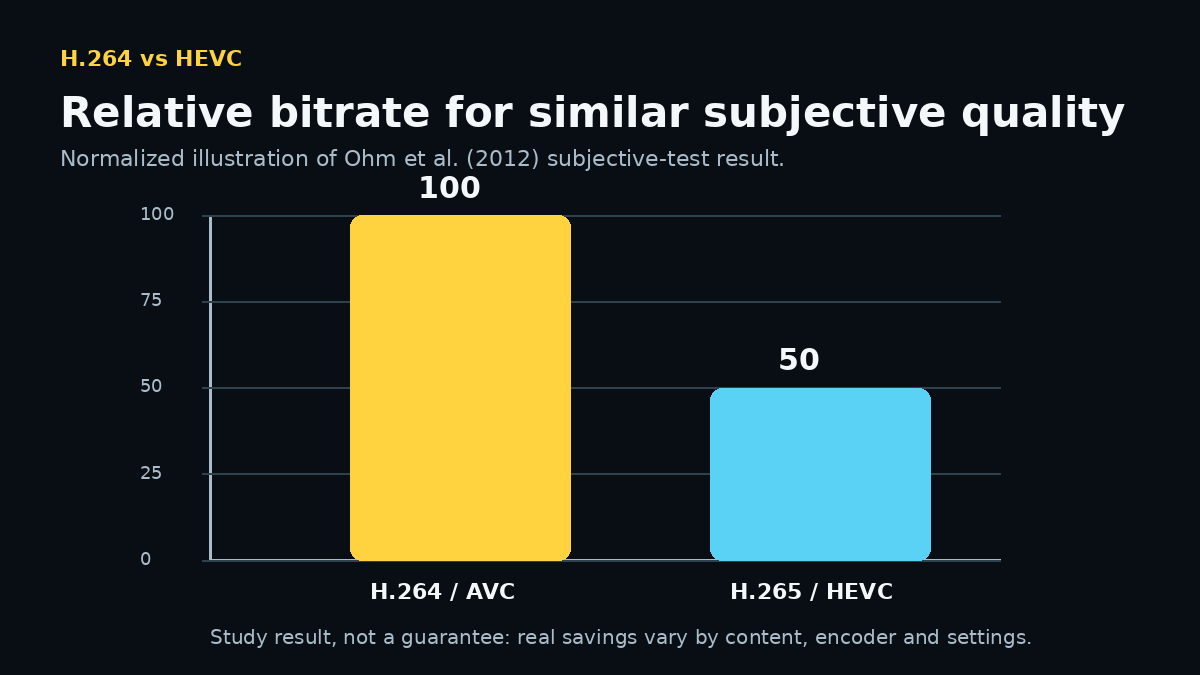
The headline result is famous: the HEVC overview targeted roughly a 50% bitrate reduction for equal perceptual quality relative to previous technology. A separate scientific comparison using subjective tests found that HEVC encoders could achieve equivalent subjective quality to H.264/AVC using approximately half the bitrate on average for the tested WVGA and HD material.
That does not mean every H.265 file is always exactly half the size. Content, encoder quality, settings, resolution and quality target all matter. But it explains why H.265 became so attractive for 4K, action cameras, drones, phones and streaming.
H.265 did not throw H.264 away
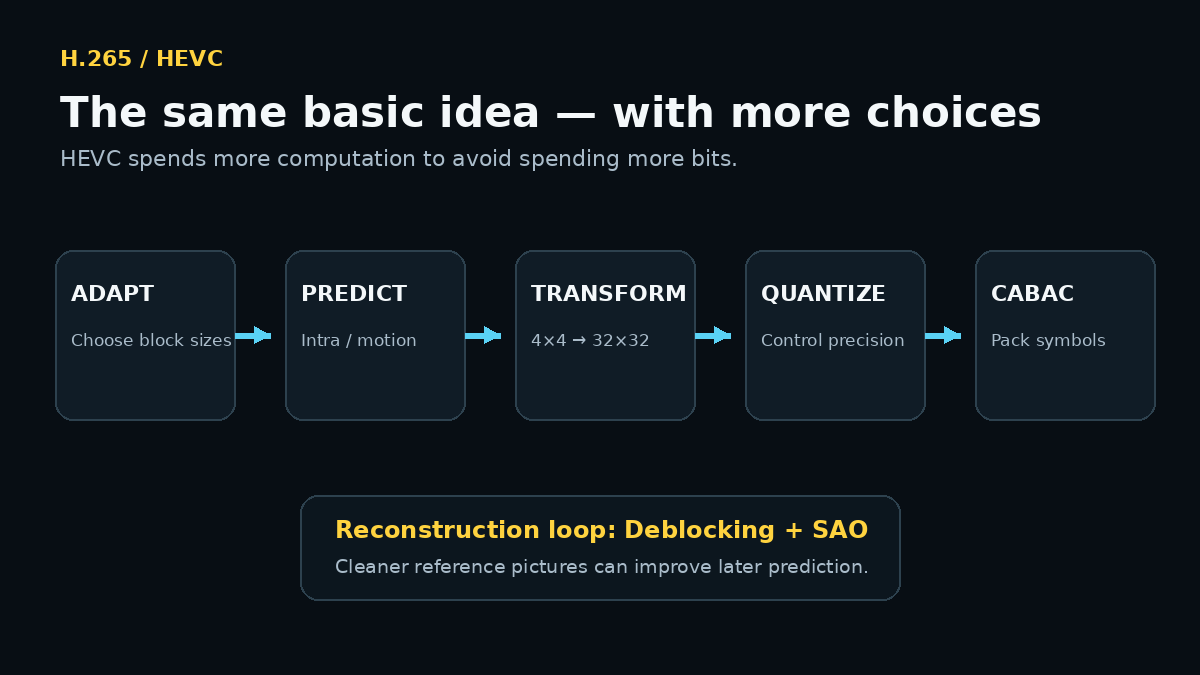
HEVC still follows the classic hybrid video-coding idea:
- predict a block;
- calculate the difference from the real image;
- transform and quantize that residual;
- entropy-code the remaining information;
- reconstruct reference pictures for later prediction.
The HEVC overview explicitly describes the same combination of intra-picture prediction, inter-picture prediction and 2-D transform coding used by earlier standards. The revolution is not a completely different philosophy. It is a much more flexible set of tools inside that philosophy.
The big change: Coding Tree Units
H.264 was organized around the familiar 16×16 macroblock. HEVC replaces that central idea with the Coding Tree Unit (CTU). In the main HEVC design, the luma coding tree block can be 16×16, 32×32 or 64×64 samples, with large sizes often improving compression.
Why can a larger block help?
Imagine a 4K shot with a huge blue sky. Splitting that smooth sky into hundreds of tiny independent regions would waste signaling bits. HEVC can describe a large smooth area using a large coding structure, then use much smaller regions where the image becomes complicated.
Quadtree partitioning explained with LEGO
A CTU is not forced to stay large. HEVC can recursively split regions using a tree structure.
Think of a large square LEGO plate:
- if the area is simple, keep the big square;
- if one part contains detail, split it into four;
- if one of those parts is still complex, split again.
The encoder can therefore use large blocks for smooth skies and walls, but smaller blocks around hair, bicycle spokes, tree branches or text.
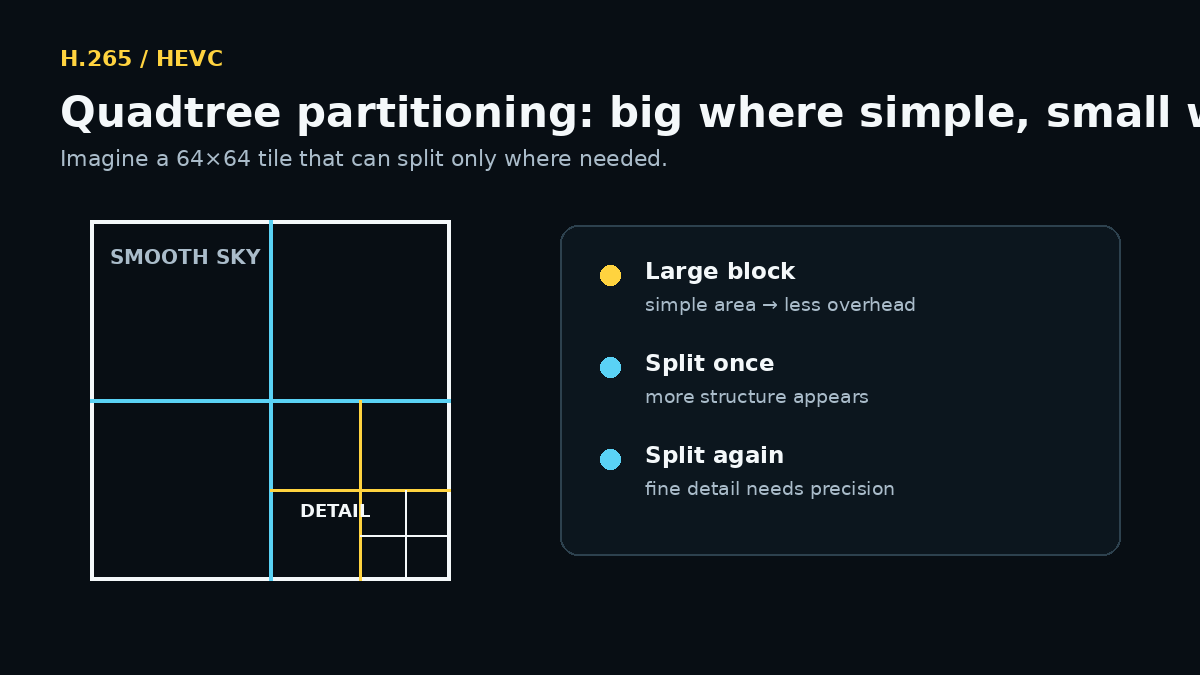
Do not spend four small descriptions when one big description is enough. But do not force one big description onto a complicated region that needs detail.
Intra prediction: H.265 has many more directions to try
Intra prediction still means predicting a block from already reconstructed pixels in the same picture.
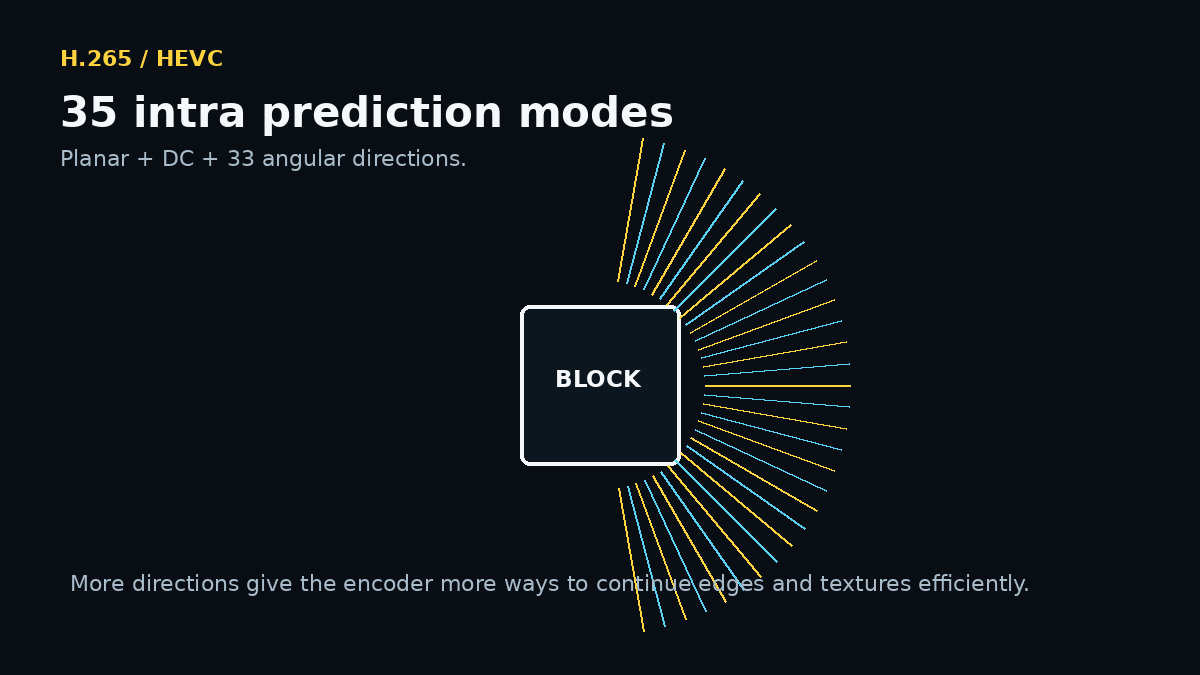
HEVC supports 35 luma intra prediction modes: planar, DC and 33 angular directions. H.264’s common 4×4 intra mode set has nine modes.
A simple analogy: H.264 has a useful set of rulers for guessing which way an edge continues. HEVC walks in with a much larger box of rulers at different angles.
That helps with diagonal lines, textures and structures that do not fit a small set of directions perfectly.
Inter prediction: smarter ways to describe motion
Like H.264, HEVC predicts blocks from reference pictures using motion vectors. It also improves how motion information is represented and predicted.
For example, HEVC includes merge mechanisms that can reuse motion information from spatial or temporal neighbors. In plain English, the codec can sometimes say:
“This block is moving like that nearby block — use the same motion description.”
That can save bits because the encoder does not always need to describe a completely new motion vector from scratch.
Transforms: from 4×4 all the way to 32×32
HEVC supports integer transform sizes from 4×4 to 32×32. Again, flexibility is the point.
A large, smooth residual may be represented efficiently with a larger transform. A small detailed region may need a smaller transform. The encoder has more choices, and those choices can reduce bitrate.
More choices, however, also mean more work during encoding. The encoder has to decide which combination is best.
Deblocking and SAO: cleaning the reconstructed picture inside the codec loop
HEVC includes an in-loop deblocking filter and a second tool called Sample Adaptive Offset (SAO).
Why filter a picture during compression?
Because reconstructed pictures are used as references for future prediction. If block edges or systematic reconstruction errors are reduced before that picture becomes a reference, later predictions can start from cleaner data.
SAO is not a beauty filter for your final edit. It is part of the codec’s reconstruction process.
CABAC: one sophisticated entropy-coding engine
HEVC uses context-adaptive binary arithmetic coding — CABAC — as its entropy-coding engine. H.264 had both CABAC and CAVLC options, while HEVC standardized around CABAC for this role.
You can think of context modeling like predictive typing. If certain symbols are more likely after certain other symbols, the encoder can represent common outcomes efficiently.
Again, this part is lossless with respect to the symbols it receives. The visual quality trade-off happened earlier when the encoder decided how accurately to quantize the transformed residual.
Does H.265 really need half the bitrate of H.264?
The scientifically responsible answer is: sometimes roughly, but not universally.
In the well-known comparison by Ohm, Sullivan, Schwarz, Tan and Wiegand, subjective tests on WVGA and HD sequences found equivalent subjective reproduction quality for HEVC at approximately 50% less bitrate on average than H.264/AVC for the tested conditions. The paper also found HEVC especially effective at low bitrates, high resolutions and low-delay applications.
That is strong evidence for the efficiency improvement. But your GoPro clip is not a laboratory average. Water, leaves, low-light noise, fast camera rotation and fine texture can all make compression harder.
Real encodes depend on the content and encoder.
Why H.265 can feel heavier even when the file is smaller
A smaller file does not automatically mean easier editing.
The HEVC encoder has more decisions available: block partitioning, prediction choices, transform choices and other optimizations. A dedicated complexity study concluded that HEVC encoders were expected to be several times more complex than H.264/AVC encoders, while optimized HEVC decoder complexity did not appear dramatically different from H.264/AVC decoding overall.
So why can real-world HEVC editing still feel painful?
- HEVC is often used for 4K or higher resolutions.
- Many camera modes are 10-bit.
- Long-GOP dependencies make random timeline access work harder.
- Hardware support varies by GPU generation, profile and bit depth.
- An editor may decode multiple streams while also applying effects, scaling and color processing.
The codec is only one part of the workload. A 10-bit 4K60 HEVC action-camera file is a much tougher editing job than a modest 1080p H.264 clip even before creative effects are added.
H.264 vs H.265 in plain English
| Question | H.264 / AVC | H.265 / HEVC |
|---|---|---|
| Core idea | Predict + encode the residual | Same core idea, with more flexible coding tools |
| Main picture structure | 16×16 macroblock foundation | CTUs up to 64×64 with tree-based splitting |
| Common small-block intra directions | 9 for 4×4 luma | 35 total luma intra modes |
| Transform sizes | Classic 4×4; 8×8 available in High profiles | 4×4 through 32×32 |
| Entropy coding | CAVLC or CABAC depending on profile/configuration | CABAC |
| Compression efficiency | Very strong and highly compatible | Typically better; study results around 50% bitrate reduction under tested conditions |
| Editing experience | Usually easier to support broadly | Can become demanding with 4K/10-bit/high-frame-rate footage |
What this means when editing H.265 in VSDC
Do not convert HEVC automatically just because it is HEVC. First test the real file on the real machine.
VSDC provides a hardware-decoder option for accelerating video decoding, supports 10-bit AVC/HEVC compression, and includes proxy workflows. VSDC 11.2 also added Vulkan-accelerated proxy transcoding, which is particularly relevant when high-resolution source files are uncomfortable to edit directly.
Our practical workflow:
- Keep the original HEVC camera files.
- Try native editing with the appropriate hardware decoder.
- If the timeline is responsive, do not create extra work.
- If seeking, multicam, effects or color processing become slow, generate proxies.
- Use the originals again for the final render.
This is why “which codec is better?” is often the wrong editing question. A better question is:
“Which workflow lets me preserve the camera data while keeping the timeline responsive?”
H.265 / HEVC FAQ
Is H.265 the same as HEVC?
Yes. H.265 is the ITU-T designation and HEVC is the common name for High Efficiency Video Coding.
Is H.265 always better quality than H.264?
No. A codec does not guarantee quality by name alone. Bitrate, encoder implementation, settings and source content matter. HEVC gives an encoder more efficient tools, but poor settings can still produce poor video.
Does H.265 always make files 50% smaller?
No. The roughly 50% figure comes from standardization goals and well-known controlled comparisons. It is a useful indication of HEVC’s efficiency, not a universal file-size law.
Why does my camera use H.265 for 10-bit or high-end modes?
HEVC is attractive for high-resolution and high-bit-depth recording because it can use storage and bitrate more efficiently. Camera vendors can therefore offer demanding recording modes without making files grow as quickly as they would with less efficient compression.
Should I transcode H.265 before editing?
Only if your workflow benefits from it. Try hardware decoding first. If playback or seeking is uncomfortable, proxies are often a better compromise than permanently replacing the originals.
Scientific sources
- Sullivan, G. J.; Ohm, J.-R.; Han, W.-J.; Wiegand, T. “Overview of the High Efficiency Video Coding (HEVC) Standard.” IEEE TCSVT, 22(12), 1649–1668, 2012. DOI: 10.1109/TCSVT.2012.2221191.
- Ohm, J.-R.; Sullivan, G. J.; Schwarz, H.; Tan, T. K.; Wiegand, T. “Comparison of the Coding Efficiency of Video Coding Standards—Including High Efficiency Video Coding (HEVC).” IEEE TCSVT, 22(12), 1669–1684, 2012. DOI: 10.1109/TCSVT.2012.2221192.
- Wiegand, T.; Sullivan, G. J.; Bjøntegaard, G.; Luthra, A. “Overview of the H.264/AVC Video Coding Standard.” IEEE TCSVT, 2003. DOI: 10.1109/TCSVT.2003.815165.
- Bossen, F.; Bross, B.; Sühring, K.; Flynn, D. “HEVC Complexity and Implementation Analysis.” IEEE TCSVT, 22(12), 1685–1696, 2012. DOI: 10.1109/TCSVT.2012.2221255.
- VSDC Video Editor documentation — hardware decoder option and 10-bit AVC/HEVC support.
- VSDC 11.2 release documentation — Vulkan hardware transcoding for proxy generation.