VIDEO CODECS • H.264 / AVC • EXPLAINED
Your camera does not need to save 60 completely new pictures every second. Most of one frame looks a lot like the frame before it. H.264 became one of the world’s most important video codecs by learning how to describe what changed instead of storing the whole picture again and again.
If you can understand a game of “spot the difference,” you can understand the basic idea behind H.264.
What H.264 actually is
H.264 is a video compression standard. You will also see it called AVC, short for Advanced Video Coding. The standard was developed jointly by experts from ITU-T and ISO/IEC MPEG. Its designers wanted better compression and a video representation that could work across storage, broadcast, streaming and communications networks.
The important word is standard. H.264 does not tell every encoder program exactly how to make every decision. Instead, it defines the format of a valid compressed bitstream and the rules a decoder must follow to reconstruct the video. That leaves encoder developers room to make their software faster, smarter or better at finding efficient compression choices.
The H.264 standard defines the grammar. Different encoders can write better or worse sentences, but a compliant decoder must still understand them.
H.264 is not MP4
This confuses almost everyone at first.
- H.264 describes how the video pictures are compressed.
- MP4 is usually the container that can hold the compressed video, audio, subtitles and metadata.
So an .mp4 file can contain H.264 video, but MP4 and H.264 are not the same thing.
The big trick: video contains a huge amount of repetition
Imagine filming a skateboarder for one second at 60 fps. You have 60 frames, but the sky, road, trees and most objects barely change from frame to frame.
A wasteful format would save every pixel again. A video codec asks a much smarter question:
“What can I predict from information I already have, and what is actually new?”
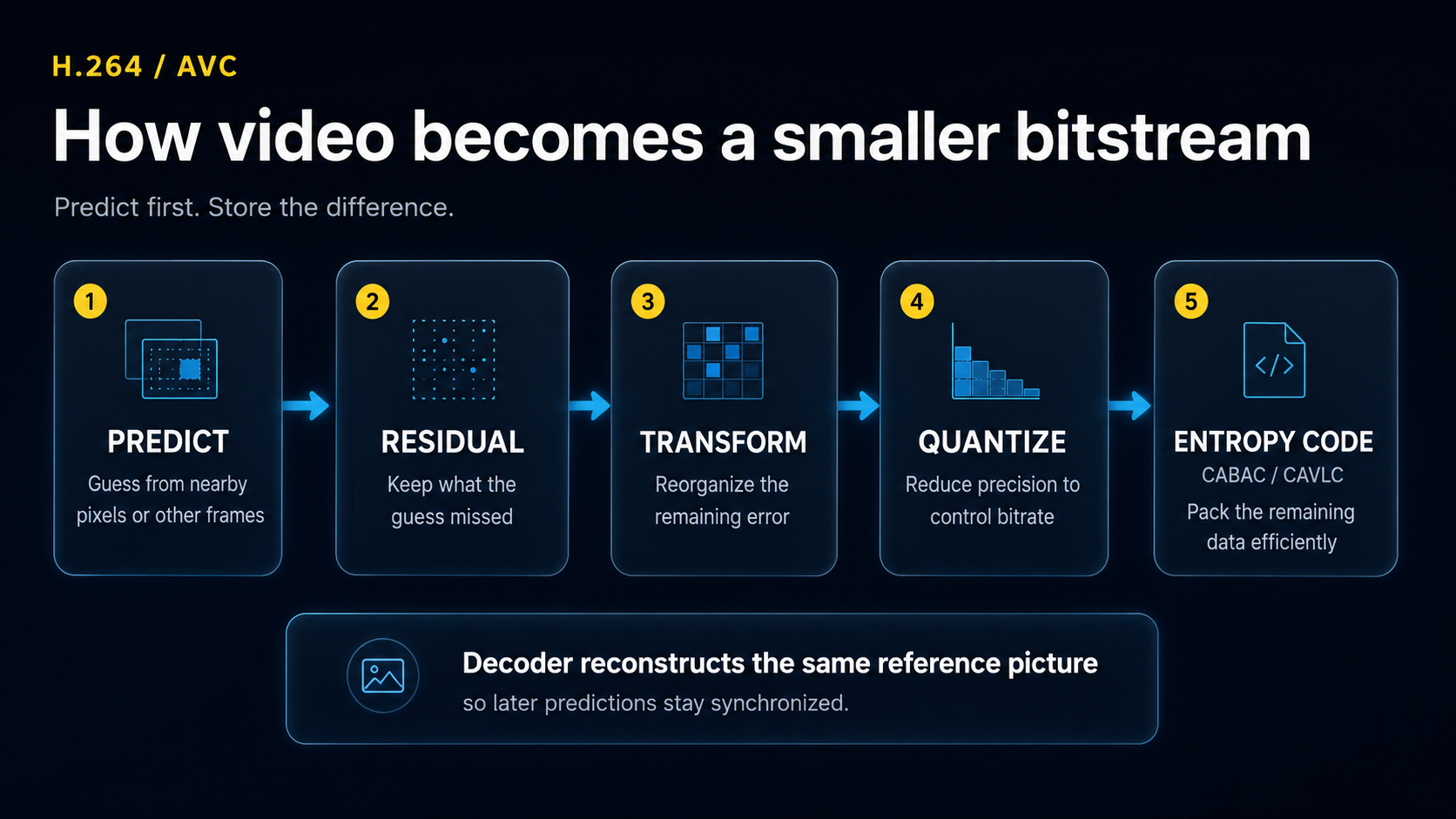
Modern video compression combines spatial prediction inside a picture, motion-based prediction between pictures, transform coding of the remaining error and entropy coding of the symbols that are left.
Why H.264 works with blocks
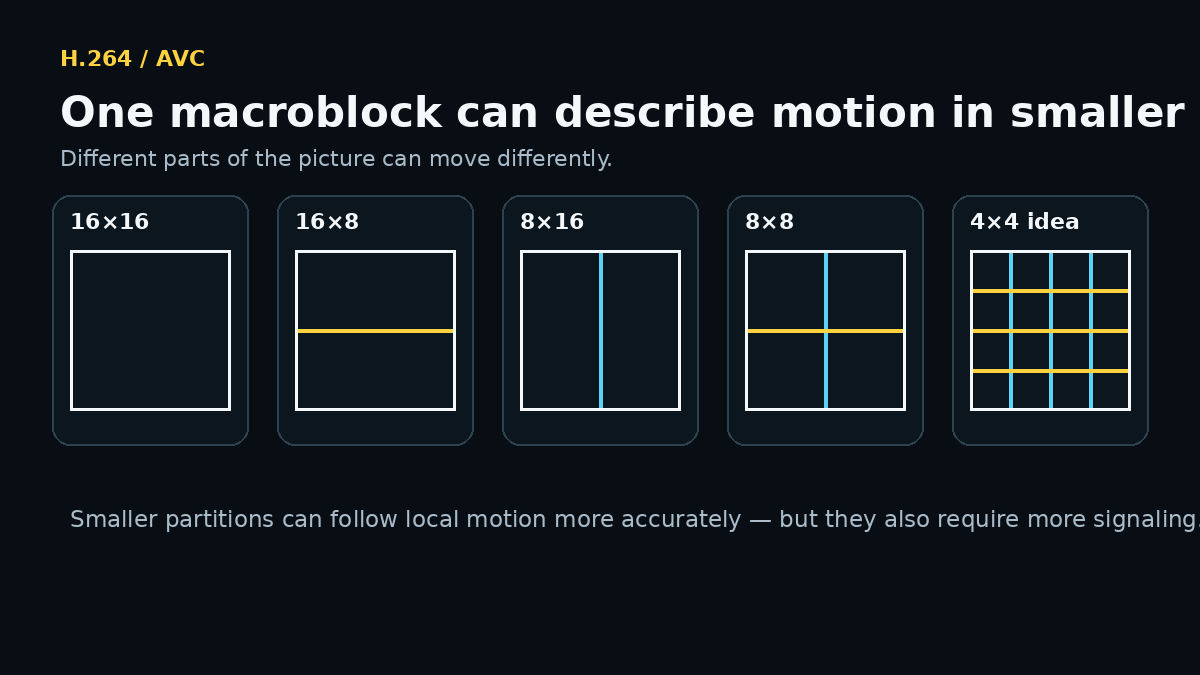
H.264 processes pictures using regions traditionally organized around a 16×16 luma macroblock. For motion compensation, those regions can be divided into smaller partitions — down to 4×4 luma blocks.
That matters because a whole picture rarely moves in one direction. A person may move right while the background stays still. One small wheel may rotate while the rest of a bicycle moves forward.
By working with smaller regions, the encoder can describe those local changes more accurately.
Intra prediction: guessing a block from pixels already nearby
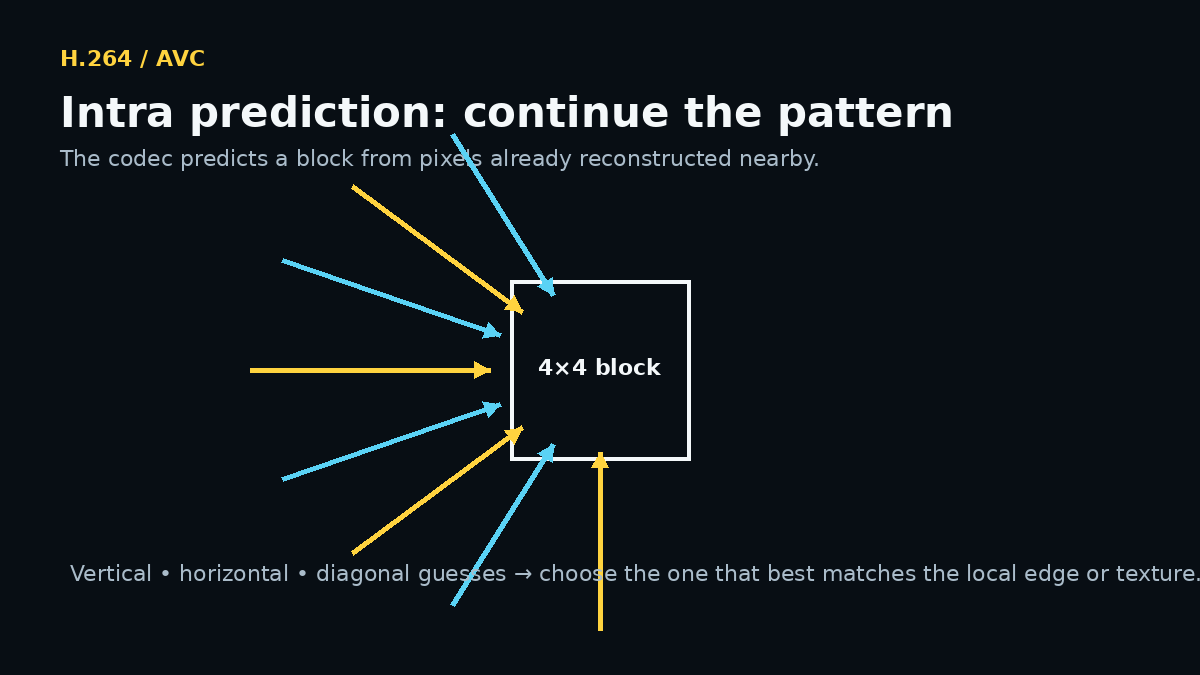
Sometimes the codec does not need another frame at all. It can predict a region from already reconstructed pixels in the same picture. This is called intra prediction.
For a 4×4 luma block, H.264 defines nine prediction modes: a DC mode plus eight directional modes. The codec can predict that an edge continues vertically, horizontally or diagonally.
Here is the teenager-friendly version: imagine drawing the next square in a pattern. If all the lines around the square are moving diagonally upward, “continue the diagonal” is a much better guess than “fill the square with random pixels.”
Inter prediction: borrowing from another frame
This is where video compression becomes especially powerful.
Suppose a helmet moves 12 pixels to the right between two frames. Instead of saving the helmet again, the encoder can point to a similar region in a reference frame and send a motion vector that says, in effect:
“Use that region from the earlier frame, but move it here.”
H.264 supports variable block-size motion compensation and sub-pixel motion accuracy, giving the encoder fine control over how regions are predicted.
The prediction will rarely be perfect. Lighting changes. Hair moves. Leaves bend. Noise changes. That leads us to the next part.
The residual: save the mistake, not the whole picture
The codec compares the prediction with the real block.
Original − Prediction = Residual.
The residual is simply the prediction error. If the prediction was good, the residual contains much less information than the original block.
This “predict first, encode the difference second” design is the core idea of hybrid video compression.
Transform and quantization: deciding how accurately to save the residual
The residual still contains pixel values, so H.264 transforms it into coefficients that are easier to compress. H.264 introduced compact integer transforms; the classic design uses a 4×4 integer transform that can be calculated exactly with integer arithmetic.
You do not need the equations to understand the practical effect. The transform reorganizes the residual so the encoder can spend bits where they matter most.
Then comes quantization. This is the lossy step. The encoder represents some coefficients less precisely, especially when you ask for a lower bitrate.
Push quantization too hard and familiar artifacts appear:
- blockiness;
- soft textures;
- smearing during fast motion;
- banding in smooth gradients;
- fine grass, water or hair turning into mush.
This is why two H.264 files at the same resolution can look completely different: resolution tells you how many pixels exist, not how accurately those pixels were compressed.
CABAC and CAVLC: compressing the symbols that remain
After prediction, transform and quantization, H.264 still has numbers and flags to store. Entropy coding packs these symbols more efficiently.
- CAVLC — simpler and lighter;
- CABAC — more sophisticated and generally more efficient, but more computationally demanding.
This stage does not “make the picture blurrier.” The visually lossy decisions mostly happened earlier during quantization. Entropy coding is closer to finding a more efficient way to write the same remaining information.
What are I, P and B frames?
| Frame type | Simple meaning | Why it exists |
|---|---|---|
| I-frame | Can be decoded without another picture | Random access, scene changes, recovery points |
| P-frame | Can use earlier reference pictures | Saves data by predicting motion/change |
| B-frame | Can use reference pictures in more flexible directions | Usually improves compression efficiency |
The more a frame depends on other frames, the less independent it is. This is one reason a highly compressed video can be easy to play but more work to edit.
Why H.264 can be harder to edit than to watch
A video player normally decodes frames in sequence. An editor constantly asks awkward questions:
- “Show me frame 18,431 right now.”
- “Now jump backward 73 frames.”
- “Now display five clips at once.”
- “Now decode while I add color correction and effects.”
With inter-frame compression, the frame you want may depend on reference frames that must be decoded first. That creates extra work when scrubbing and seeking.
This is why proxy media and hardware decoding can make such a large practical difference even though they do not change the creative content of the project.
What this means when editing H.264 in VSDC
For ordinary H.264 footage, editing the original files directly may be perfectly comfortable. When the project becomes heavier, VSDC provides a hardware-decoder option and proxy workflows; recent versions also added hardware-accelerated proxy transcoding through Vulkan.
A sensible workflow is:
- Try the original H.264 footage first.
- If scrubbing is smooth, keep editing natively.
- If high resolution, many layers or effects make the timeline heavy, enable hardware decoding where appropriate.
- If that is still not enough, create proxies. Edit the lightweight copies while preserving the original files for final output.
H.264 is excellent at delivery. The trick is knowing when its compression structure is doing useful work for storage — and when an editor should temporarily use a lighter representation for responsiveness.
H.264 in one minute
| Stage | Plain-English explanation |
|---|---|
| Prediction | Guess the block from nearby pixels or other frames. |
| Residual | Keep the difference between the guess and reality. |
| Transform | Reorganize that difference into coefficients that compress well. |
| Quantization | Reduce precision to control bitrate and file size. |
| Entropy coding | Pack the remaining symbols efficiently. |
| Reconstruction | Rebuild the same reference picture the decoder will use. |
H.264 FAQ
Is H.264 the same as AVC?
Yes. H.264 and AVC usually refer to the same video coding standard: ITU-T H.264 / MPEG-4 AVC.
Is H.264 the same as MP4?
No. H.264 is a video codec. MP4 is a container that can carry H.264 video along with audio and metadata.
Is H.264 still useful in 2026?
Yes. It remains widely supported in hardware, software, cameras, browsers and delivery systems. Newer codecs can be more efficient, but H.264 remains one of the safest formats when compatibility matters.
Why does my H.264 footage lag in an editor?
Inter-frame compression means the editor may need to decode reference frames before it can show the exact frame you requested. High resolution, high frame rate, many layers and effects can add more load. Hardware decoding or proxies can help.
Should I convert every H.264 file before editing?
No. If the original footage edits smoothly, there is no reason to add an unnecessary conversion step. Use proxies or intermediates when the real workflow needs them.
Scientific sources
- Wiegand, T.; Sullivan, G. J.; Bjøntegaard, G.; Luthra, A. “Overview of the H.264/AVC Video Coding Standard.” IEEE TCSVT, 13(7), 560–576, 2003. DOI: 10.1109/TCSVT.2003.815165.
- Sullivan, G. J.; Wiegand, T. “Video Compression—From Concepts to the H.264/AVC Standard.” Proceedings of the IEEE, 93(1), 18–31, 2005. DOI: 10.1109/JPROC.2004.839617.
- Malvar, H. S.; Hallapuro, A.; Karczewicz, M.; Kerofsky, L. “Low-Complexity Transform and Quantization in H.264/AVC.” IEEE, 2003.
- VSDC Video Editor documentation — hardware decoder option.
- VSDC 11.2 release documentation — Vulkan hardware transcoding for proxy generation.